Claude Code stores user prompts as markdown under .claude/commands/ (slash commands) or .claude/skills/ (skills). Custom commands merged into skills; the commands reference now points to skills for new additions.
.claude/commands/deploy.md and .claude/skills/deploy/SKILL.md both expose /deploy.
Legacy command files still work.
Skills add: directory layout, frontmatter permissions, and implicit invocation when the user’s request matches the skill description.
1 Invocation modes
Slash commands — one entry point: user types /name.
Skills — two entry points:
Direct — /skill-name plus arguments ($ARGUMENTS, $N, or named placeholders from frontmatter arguments).
Implicit — Claude matches user phrasing against each skill’s description and invokes without a slash (invocation control).
Same skill, both doors:
# Direct: you point at it
/contrast-audit styles/main.css
# Implicit: you describe the need
Is the button text readable
against that new background color?
The left substitutes styles/main.css into the skill body. The right matches the skill description (“audit CSS color contrast”) and invokes with inferred arguments.
2 Skill directory layout
Commands were single markdown files. Skills are directories with required SKILL.md:
my-skill/
├── SKILL.md         # required: YAML frontmatter + markdown instructions
├── reference.md     # optional: detailed docs, loaded only when needed
├── examples.md      # optional: sample outputs showing expected format
├── template.md      # optional: fill-in-the-blank templates
└── scripts/
    └── helper.py    # optional: executable — run, never loaded into context
SKILL.md structure:
YAML frontmatter — metadata for invocation timing; only description is loaded into context upfront.
Markdown body — instructions; on invoke, rendered body is inserted as a message for the session.
Supporting files load on demand; scripts execute without entering context. Dynamic lines like !`git diff HEAD` run at invoke time (dynamic context injection).
Frontmatter controls permission and timing. description is recommended — drives auto-invocation; write what it does and when to use it (combined with when_to_use, truncated at 1,536 characters in listings).
Field
What it does
name
Display name in skill listings. Defaults to the directory name (which is what names the /command for personal and project skills).
description
What the skill does and when to use it. Drives Claude’s decision to auto-invoke. Falls back to the body’s first paragraph if omitted.
when_to_use
Extra trigger context (phrasings, example requests). Appended to description in the listing.
argument-hint
Autocomplete hint for expected arguments, e.g. [css-file].
arguments
Names for positional arguments, enabling $name substitution in the body.
disable-model-invocation
true = only you can invoke it. Use for side-effectful workflows (/deploy, /commit) where Claude shouldn’t decide the timing. Also removes the description from context.
user-invocable
false = hidden from the / menu; only Claude can invoke it. For background knowledge that isn’t a meaningful user action.
allowed-tools
Tools Claude may use without a permission prompt during the turn that invokes the skill. The grant clears on your next message.
disallowed-tools
Tools removed from Claude’s pool while the skill is active.
model
Model override while the skill runs (rest of the current turn).
effort
Effort-level override (low … max) while the skill is active.
context
fork = run the skill in an isolated subagent instead of inline. See next section.
agent
Which subagent type executes a context: fork skill (default general-purpose).
background
With context: fork: false waits for the result in the invoking turn instead of running in the background (default true).
hooks
Hooks scoped to this skill’s lifecycle.
paths
Glob patterns; the skill only auto-activates when Claude is working with matching files.
shell
bash (default) or powershell for !`command` dynamic-context lines.
4 Context window model
Analogy: index (name, description) always loaded; body read on invoke; supporting files and scripts loaded or executed only when referenced. Commands loaded the full method on every invoke.
Three combinations, then, differing in whose system prompt is in charge, where the task text comes from, and whether the work happens in your context or somewhere else:
Approach
System prompt
Task comes from
Context
Skill (default)
your session’s
SKILL.md body, inline
shared with your conversation, persists
Skill with context: fork
from the agent type
SKILL.md body
isolated subagent
Subagent with skills:
the subagent’s own body
Claude’s delegation message
isolated, skills preloaded as reference
Rule: knowledge/procedures → skill; isolated heavy work → subagent; authored task off to the side → context: fork.
6 Example: contrast-audit skill
WCAG 2.1 requires contrast ratio ≥ 4.5:1 (AA) for normal text (WCAG 2.1 contrast minimum). AAA: 7:1.
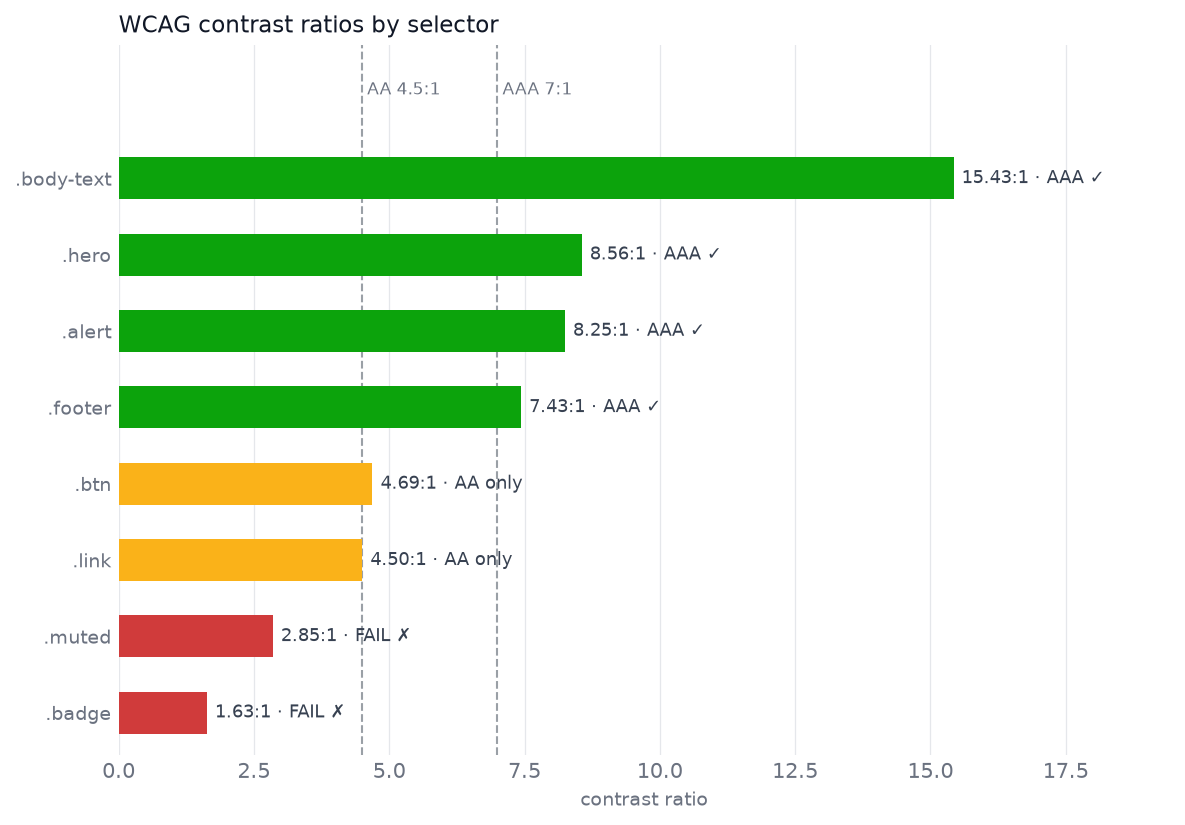
Skill scans CSS color pairs, computes ratios, outputs chart and HTML report. Code below executes at render time.
---name: contrast-auditdescription: Audit a CSS file for WCAG color-contrast failures. Use when the user asks to check contrast, color accessibility, or whether text is readable against its background.argument-hint:"[css-file]"allowed-tools: Bash(python3 ${CLAUDE_SKILL_DIR}/scripts/audit.py *)---Audit the CSS file the user named (if none given, find `*.css` in theproject and ask which one):```bashpython3 ${CLAUDE_SKILL_DIR}/scripts/audit.py $ARGUMENTS```The script prints one line per color pair, writes `contrast-chart.png` and`contrast-report.html` next to the CSS file, and exits non-zero if any pairfails AA.After it runs:1. Summarize the failures, worst ratio first.2. For each failure, propose a darkened/lightened replacement hex that clears 4.5:1 while staying close to the original hue.3. Point the user at `contrast-report.html` for the visual version.
6.1 audit.py
Plain Python: regex for CSS color pairs, WCAG relative luminance, matplotlib chart, HTML report. Script output — not model arithmetic — enters context.
scripts/audit.py — the full script (click to expand)
"""contrast-audit: WCAG contrast checker for CSS color pairs."""import reimport sysfrom dataclasses import dataclassfrom pathlib import Pathimport matplotlib.pyplot as pltHEX =r"#[0-9a-fA-F]{6}\b|#[0-9a-fA-F]{3}\b"AA, AAA =4.5, 7.0# Status colors for the chart: good / warning / critical.GRADE_COLOR = {"AAA": "#0ca30c", "AA": "#fab219", "FAIL": "#d03b3b"}GRADE_LABEL = {"AAA": "AAA ✓", "AA": "AA only", "FAIL": "FAIL ✗"}@dataclassclass Pair: selector: str fg: str bg: str ratio: float grade: strdef expand_hex(h: str) ->str: h = h.lstrip("#").lower()iflen(h) ==3: h ="".join(c *2for c in h)returnf"#{h}"def relative_luminance(hex_color: str) ->float:"""WCAG 2.1 relative luminance of an sRGB color.""" h = expand_hex(hex_color).lstrip("#") channels = [int(h[i : i +2], 16) /255for i in (0, 2, 4)] lin = [c /12.92if c <=0.04045else ((c +0.055) /1.055) **2.4for c in channels]return0.2126* lin[0] +0.7152* lin[1] +0.0722* lin[2]def contrast_ratio(fg: str, bg: str) ->float: lighter, darker =sorted((relative_luminance(fg), relative_luminance(bg)), reverse=True)return (lighter +0.05) / (darker +0.05)def grade(ratio: float) ->str:return"AAA"if ratio >= AAA else"AA"if ratio >= AA else"FAIL"def parse_pairs(css: str) ->list[Pair]:"""Find rules declaring both a text color and a background color (hex only).""" pairs = []for m in re.finditer(r"([^{}]+)\{([^}]*)\}", css): selector, body = m.group(1).strip(), m.group(2) fg = re.search(rf"(?<![-\w])color\s*:\s*({HEX})", body) bg = re.search(rf"background(?:-color)?\s*:\s*({HEX})", body)if fg and bg: f, b = expand_hex(fg.group(1)), expand_hex(bg.group(1)) r = contrast_ratio(f, b) pairs.append(Pair(selector, f, b, r, grade(r)))return pairsdef contrast_chart(pairs: list[Pair], path: str|None=None):"""Horizontal bars of contrast ratio, color-coded by grade, thresholds marked.""" pairs =sorted(pairs, key=lambda p: p.ratio) fig, ax = plt.subplots(figsize=(8, 0.55*len(pairs) +1.2), dpi=150) fig.patch.set_facecolor("white") ys =range(len(pairs)) ax.barh(ys, [p.ratio for p in pairs], height=0.55, color=[GRADE_COLOR[p.grade] for p in pairs], zorder=3) ax.set_ylim(-0.55, len(pairs) +0.75)for thr, name in ((AA, "AA 4.5:1"), (AAA, "AAA 7:1")): ax.axvline(thr, color="#9aa0a6", lw=1, ls="--", zorder=2) ax.text(thr, len(pairs) +0.05, f" {name}", color="#6b7280", fontsize=8, va="bottom")for y, p inzip(ys, pairs): ax.text(p.ratio +0.15, y, f"{p.ratio:.2f}:1 · {GRADE_LABEL[p.grade]}", va="center", fontsize=8.5, color="#374151") ax.set_yticks(list(ys), [p.selector for p in pairs], fontsize=9) ax.set_xlim(0, max(p.ratio for p in pairs) +4) ax.set_xlabel("contrast ratio", fontsize=9, color="#6b7280") ax.tick_params(colors="#6b7280", length=0)for spine in ax.spines.values(): spine.set_visible(False) ax.grid(axis="x", color="#e5e7eb", lw=0.6, zorder=0) ax.set_title("WCAG contrast ratios by selector", fontsize=11, color="#111827", loc="left") fig.tight_layout()if path: fig.savefig(path, bbox_inches="tight")return figdef render_report(pairs: list[Pair]) ->str:"""Self-contained HTML fragment: swatch preview per pair with pass/fail badges.""" badge =lambda ok, label: (f'<span style="font:600 11px system-ui;padding:2px 8px;border-radius:10px;'f'color:#fff;background:{"#0ca30c"if ok else"#d03b3b"}">'f'{"✓"if ok else"✗"}{label}</span>' ) rows =""for p insorted(pairs, key=lambda p: p.ratio): rows +=f''' <div style="display:flex;align-items:center;gap:14px;padding:10px 12px; border:1px solid #e5e7eb;border-radius:8px;margin:6px 0; background:#fff"> <div style="width:72px;height:44px;border-radius:6px;flex:none; display:flex;align-items:center;justify-content:center; font:700 18px system-ui;color:{p.fg};background:{p.bg}; border:1px solid #d1d5db">Aa</div> <div style="flex:1;font:13px ui-monospace,monospace;color:#111827">{p.selector}<br> <span style="color:#6b7280">{p.fg} on {p.bg}</span> </div> <div style="font:600 14px system-ui;color:#111827;width:64px">{p.ratio:.2f}:1</div>{badge(p.ratio >= AA, "AA")}{badge(p.ratio >= AAA, "AAA")} </div>'''returnf'<div style="max-width:640px;font-family:system-ui">{rows}</div>'def main(argv: list[str]) ->int: css_path = Path(argv[0]) if argv else Path("styles.css") pairs = parse_pairs(css_path.read_text())for p insorted(pairs, key=lambda p: p.ratio):print(f"{p.selector:<14}{p.fg} on {p.bg}{p.ratio:5.2f}:1 {p.grade}") contrast_chart(pairs, str(css_path.with_name("contrast-chart.png"))) report ="<!DOCTYPE html><meta charset='utf-8'><title>Contrast audit</title>" \f"<body style='background:#f9fafb;padding:24px'>{render_report(pairs)}</body>" css_path.with_name("contrast-report.html").write_text(report)return1ifany(p.grade =="FAIL"for p in pairs) else0if__name__=="__main__"and"ipykernel"notin sys.modules: sys.exit(main(sys.argv[1:]))
6.2 Sample CSS
Hand-written sample.css for this post: eight rules, mix of pass/marginal/fail. #0d6efd (Bootstrap link blue) on white: 4.5008:1 — tuned to AA threshold.
.badge       #ffffff on #ffc107   1.63:1  FAIL
.muted       #999999 on #ffffff   2.85:1  FAIL
.link        #0d6efd on #ffffff   4.50:1  AA
.btn         #ffffff on #6c757d   4.69:1  AA
.footer      #adb5bd on #212529   7.43:1  AAA
.alert       #721c24 on #f8d7da   8.25:1  AAA
.hero        #ffffff on #4a3aa7   8.56:1  AAA
.body-text   #212529 on #ffffff  15.43:1  AAA
Printed lines = script stdout (what Claude reads). Chart: bars sorted worst-first with AA/AAA thresholds.
Two notable failures: white on #ffc107 (1.63:1); #0d6efd on white (4.5008:1, no margin).
Pattern: thin SKILL.md + deterministic script + model for orchestration and fix suggestions.
fig = contrast_chart(pairs, "contrast-chart.png")
from IPython.display import HTMLreport_fragment = render_report(pairs)Path("contrast-report.html").write_text("<!DOCTYPE html><meta charset='utf-8'><title>Contrast audit</title>"f"<body style='background:#f9fafb;padding:24px'>{report_fragment}</body>")HTML(report_fragment)
Aa
.badge #ffffff on #ffc107
1.63:1
✗ AA✗ AAA
Aa
.muted #999999 on #ffffff
2.85:1
✗ AA✗ AAA
Aa
.link #0d6efd on #ffffff
4.50:1
✓ AA✗ AAA
Aa
.btn #ffffff on #6c757d
4.69:1
✓ AA✗ AAA
Aa
.footer #adb5bd on #212529
7.43:1
✓ AA✓ AAA
Aa
.alert #721c24 on #f8d7da
8.25:1
✓ AA✓ AAA
Aa
.hero #ffffff on #4a3aa7
8.56:1
✓ AA✓ AAA
Aa
.body-text #212529 on #ffffff
15.43:1
✓ AA✓ AAA
7 Migration
Legacy .claude/commands/ files still work. Migration is mechanical — suitable for agent-assisted bulk conversion.
Migrate every file in .claude/commands/ to .claude/skills/<name>/SKILL.md.
Keep each command's body verbatim. Add a description in the frontmatter
saying what it does and when to use it, phrased the way I'd ask for it.
Set disable-model-invocation: true on anything side-effectful (deploy,
commit, release). Delete the old command files and open a PR.
Review PR for side-effectful skills: without disable-model-invocation: true, Claude can auto-invoke /deploy-class workflows.
Write new prompts as skills when they need helper scripts, reference docs, allowed-tools, or implicit invocation.