9 Publishing and Proving the Rebuild
Quarto, reproducible publishing, coding agents, Markdown, Python, EPUB, data analysis, k-means clustering
The guide is finished, and nobody but you can see it: every output sits in a folder on your computer. This chapter puts it on the web, where anyone can open it on a phone, with GitHub to keep a copy of the history you have been committing and GitHub Pages to serve the result. Then it asks the question the whole workflow is built to answer: if one input changes, which outputs change with it, and how do you know? That question comes with no prompt. It tests whether you can predict what a rebuild will do, and then check.
- Explain what pushing, branches and pull requests add to the commits you already make.
- Make the folder a website and publish it to GitHub Pages.
- Choose between hosts that take your files and hosts that build.
- Predict, rebuild and explain what one changed input reaches.
9.1 Git: every change, safely
Section 1.4 likened Git to Word’s Track Changes for a whole folder, with a lasting history, and since the first report (Section 5.4) you have kept one yourself: git status and git diff before each commit, a message that says why, and git restore for a change you did not want. That is what Git does inside one folder, and it already keeps every earlier version of the guide, each with a note saying why it changed. Publishing needs what Git does beyond the folder: a copy of the history that others can reach, and a way for someone else to read a change and approve it before it counts.
The vocabulary for that is short (Figure 9.1; Pro Git and GitHub’s documentation, checked 2026-10-31). Your folder is already a repository, a project folder with its history, and each of your commits is a snapshot of every tracked file with its message. The new words are about sharing them.
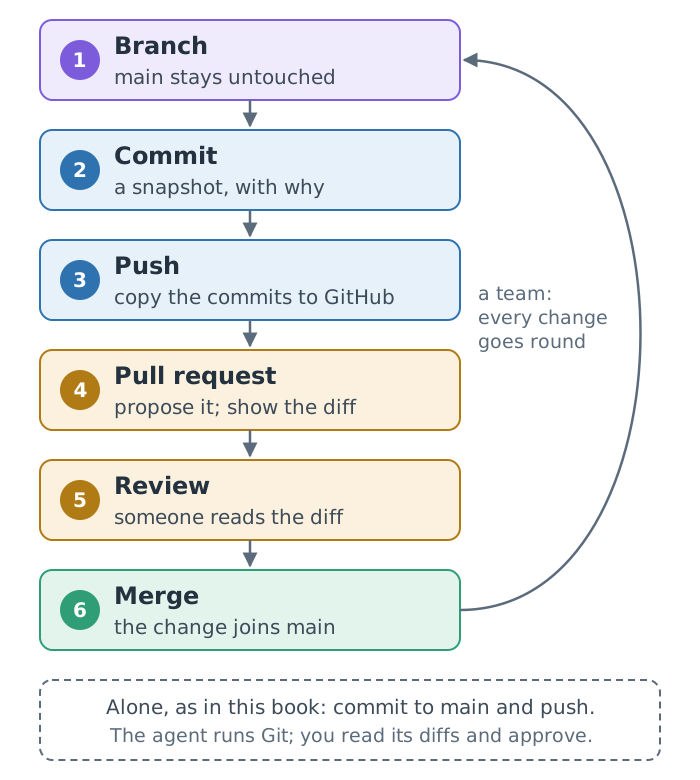
To push is to copy commits to the shared repository on GitHub, the website that keeps a copy of a repository online. A branch is a movable label on a line of commits, so work can go on there while the main line, main (the name git init -b main gave it), keeps working. A pull request proposes merging a branch and shows its difference, or diff, line by line, as git diff does in your terminal, but on a page that others can read; a review comments on it, approves it or asks for changes; merging adds its commits to main.
Working alone, as in this book, you commit straight to main and push; in a team, every change goes round the loop. Either way the check is the one you already make: read the diff before a change counts. From here the agent can run the Git commands too. Ask it to “commit with a message that says why”, and read its diff before you approve: a diff is the clearest check you have of what the agent actually did.
The agent reports “Committed the dashboard changes” and asks to push. What do you check before you approve?
The diff behind the commit: which files and lines changed, that they are the ones you asked for, that nothing in data/ or images/ changed, and that the message says why.
9.2 Where a site lives
A rendered Quarto website is static: a folder of HTML, CSS, JavaScript, images and documents, with no program running on a server. Any web server can serve it, so publishing means copying that folder to a host. GitHub Pages is the host this book uses, because the repository is already on GitHub and quarto publish gh-pages is built in (Figure 9.2).
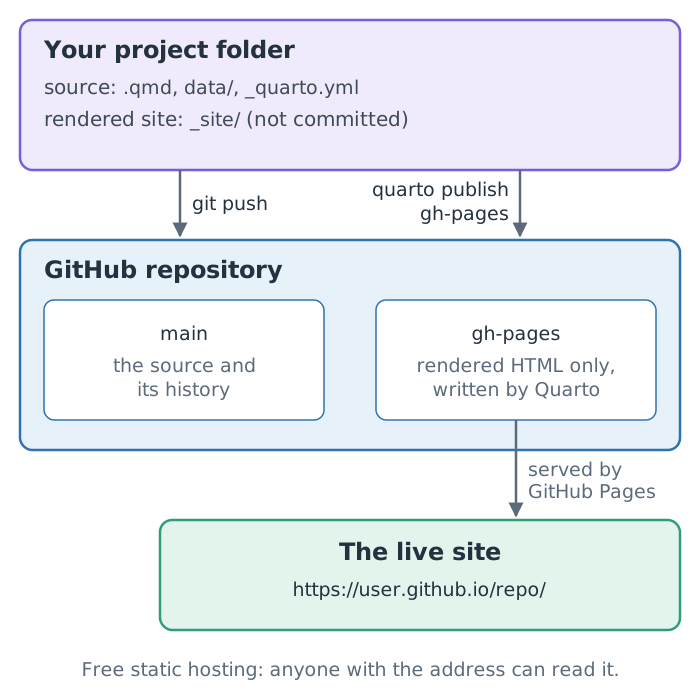
main branch with Git; quarto publish gh-pages renders the site on your computer and pushes only the rendered HTML to a separate branch, which GitHub serves.
There are two ways to get a site onto a host. Either you render on your own computer and upload the result, as quarto publish does for GitHub Pages and Netlify, or the host builds the site from your repository on every push. The second works only if the build installs Quarto, Python and every package the project needs, or if the rendered output is committed. The London repository leaves its rendered _site/ folder out, so a host that builds would produce nothing until the build is set up.
You connect london-guide to a host that builds from Git, and it publishes an empty site. Why?
The repository holds no rendered site, because .gitignore leaves _site/ out, and the host’s build has no Quarto, Python or packages unless you install them in it. Either render on your computer and upload the result, or set up the build.
Six hosts with free plans for static sites show the two routes (Table 9.1, Table 9.2). Their free plans change, so Table K.2 in Appendix K lists each one’s current limits, with the date they were checked: read them before choosing.
| Host | Upload with |
|---|---|
| GitHub Pages | quarto publish gh-pages, this book’s route |
| Netlify | quarto publish netlify |
| Cloudflare | wrangler deploy |
| Host | How it builds |
|---|---|
| Vercel | from the repository, on every push |
| GitLab Pages | publishes a public folder from a CI job |
| Render | rebuilds on every push |
Two details matter for this project. Quarto’s Netlify build plugin runs no Python, so render on your computer and upload. GitLab builds in a CI job, a build it runs on each push: set output-dir: public and install Quarto and Python in the job. Quarto Pub, Quarto’s own free host, is being replaced by Posit Connect Cloud.
9.3 One folder, one website
Make this folder a Quarto website: _quarto.yml (render only the .qmd files; navbar: Guide, Dashboard, a Downloads menu for the docx, pdf, pptx, epub and london-slides.html files that exist) and index.qmd, and add /_site/ to .gitignore. Render and check the links.writes 2 files · adds a line to .gitignore · uv run quarto render → _site/
then, in the preview tab: Ctrl+C, and uv run quarto preview
A _quarto.yml file at the top of the folder turns it into a project. quarto render with no file name then builds every listed page into _site/, with shared navigation, and quarto preview with no file name previews the whole site. The dashboard becomes one page of it:
- 1
-
An explicit
renderlist keeps the README, the data notes and the photo credits from becoming pages of the site. - 2
- The menu links the files the other formats wrote: the Word guide, the PDF, the flyer, and whichever optional files you made.
.gitignore gains one line, for the rendered site, _site/, which is rebuilt from the source and published separately (Section 9.4). The rest of the list has been there since you started the folder (Section 6.2): the environment .venv/ (rebuilt from uv.lock), Quarto’s working files and the outputs rendered beside the sources. index.qmd becomes the site’s home page, index.html, the page a visitor sees at the site’s address.
9.4 Publish
Before you paste the next prompt, replace <your-github-username> with your GitHub username (the agent can look it up with gh api user if you ask it to).
If this folder is not yet a Git repository, run `git init -b main`; check that .gitignore covers _site/, .quarto/, .venv/, *_files/, *.quarto_ipynb, london*.html, *.docx, *.pdf, *.pptx and *.epub. Replace README.md in this folder with a short one linking to https://<your-github-username>.github.io/london-guide/ and listing the files in the site's Downloads menu. Commit it with any work not yet committed (nothing that .gitignore leaves out), then create a public GitHub repository named `london-guide` with gh and push `main` to it. Set the repository's website to the same URL with `gh repo edit --homepage`. Show me the README and the website URL you set.git status · git commit · gh repo create london-guide … · gh repo edit --homepage …
approve gh · in the preview tab: Ctrl+C, then uv run quarto publish gh-pages and Enter · open the address on your phone
The agent creates the repository on GitHub from your folder with gh repo create london-guide --public --source=. --push, which also pushes the commits, using the sign-in from the setup check. Every commit you have made since you started the folder goes with them, so the repository on GitHub opens with the guide’s whole history, one checked step at a time. Its README is the first thing visitors to the repository see, and its link takes them on to the live site.
The first publish is yours, typed in the terminal. Stop the preview first: the publish renders the whole site, and two renders in one folder collide. It asks one question, “Publish site … (Y/n)”, which Enter answers yes; then it renders the site, creates the gh-pages branch, pushes the rendered site and opens it. Quarto’s GitHub Pages guide says to run quarto publish gh-pages locally, once, before setting up a GitHub Action to publish (checked 2026-11-12). Make that first run interactive, too: in a dry run with Quarto 1.6.40, --no-prompt stopped the first publish with “the remote origin does not have a branch named gh-pages”. That was observed with 1.6.40 and not re-tested with 1.10.20. Once the branch exists, the agent can update the site with uv run quarto publish gh-pages --no-prompt.
In that dry run, the first publish of each site took one and a half to two minutes, and GitHub Pages then built it in 20 to 35 seconds, so a 404 page in the first minute usually means the site is still being deployed.
A push that fails with HTTP 400 (“RPC failed”, “the remote end hung up unexpectedly”) was seen with larger sites, such as dashboards with embedded maps. Raise Git’s buffer for this repository with git config http.postBuffer 524288000, and push again.
Publishing from your own computer is simple and keeps the build where your environment is. The alternative, a GitHub Action that renders on every push (Quarto’s quarto-dev/quarto-actions), needs Python and the project’s packages installed in the job, or freeze set so that committed results are reused, and Quarto’s guide still asks for one local quarto publish gh-pages first.
9.5 Change one input, explain the rebuild
Chapter 1 began with a correction (Section 1.1): ALVA revises one figure, and in a copy-and-paste workflow someone has to carry it by hand into every file that quotes it. Here is that scenario for real, in a project where no visitor count was ever copied. You made the same move on a smaller scale with the first report (Section 5.5) and predicted one for the guide’s first three formats (Section 7.5); now it covers every page. No prompt is supplied: write your own, or do it by hand. Make the edit to the data yourself, for example with nano data/attractions.csv (Ctrl+O, Enter, Ctrl+X): the project’s rules keep the agent out of data/, which is the point of them.
The value is fictitious: chosen to change the top attraction, so that the effect is visible, and reversible, because the real file has been committed since you copied it in (Section 6.8). git restore puts a file back as it was at the last commit, and the second rebuild leaves no trial number in your files.
Check your prediction
To check, you need to know which page reads which input. Table 9.3 is computed from the finished project’s sources, optional pages included: a page counts as reading a file only if its code loads it.
.qmd file) reads which file in data/, and the formats it writes. Computed from the sources: a mark means the page’s code loads the file.
| Page | Writes | attractions | visits | churches | sights |
|---|---|---|---|---|---|
| london | html, docx, pdf, pptx, epub, slides | ● | |||
| london-dashboard | html | ● | ● | ● | |
| london-email | docx | ● | |||
| london-flyer | |||||
| london-social | ● | ||||
| london-whitepaper | ● | ● |
In all, five pages load attractions.csv, and between them they write ten files, so the change reaches all of them at the next render.
What it does there depends on each page’s code. Of those pages, three (the guide, the dashboard and the partner brief) find the top attraction with attractions["visits_2025"].idxmax() and the total with .sum(), so in each of them the Tower of London becomes the most visited attraction and the total rises. The square advert uses only the first call, so it names the Tower too.
The white paper names no top attraction: its sums by admission change, but its table keeps ALVA’s rank_uk column from the file, which would still rank the Tower ninth in the UK beside the most visits of the ten. A copied column goes stale too. Still, that answers the question Chapter 1 began with: the correction reaches ten files with one command, and nobody has to go looking for them.
Copies deserve a second look. The flyer loads no data at all, and the sights tables in the guide and the partner brief are typed, although the guide’s credits name sights.csv: all three copy their facts (price bands, nearest stations) from the cited file into the Markdown. That was a reasonable choice, because those facts rarely change, but it means a correction to sights.csv updates none of them. A cited copy is still a copy.
Why does every page recompute, even ones whose sources did not change? Because the project keeps Quarto’s default, freeze: false: every render re-runs every page’s code, which keeps this exercise’s answer simple. With caching turned on, a page whose own source did not change would keep its old numbers, and the answer would depend on the cache; Chapter 23 returns to that trade-off.
Two more things do not change: the live site, until you publish again (uv run quarto publish gh-pages --no-prompt), and any output you did not rebuild. Model answers, with the follow-up questions worth asking, are in Appendix E.
9.6 A white paper (optional)
The same data can also become an academic paper: an abstract, numbered sections, computed results and a reference list, set in the typeface LaTeX documents use, without installing LaTeX.
Create london-whitepaper.qmd, an A4 Typst white paper in "New Computer Modern": an abstract (no inline code), numbered Introduction, Methods, Results and Conclusions, then References via `#set bibliography(title: [References])` (references.bib from `url`). Analyse data/visits.csv vs 2019 and data/attractions.csv by `admission`. Add it to `render` and the "Downloads" menu; render; check citations. Figures must be vector: set `fig-format: svg` and check that the files in `figure-typst/` end in .svg.- 1
- Typst 0.15, bundled with Quarto 1.10.20, includes New Computer Modern, the OpenType version of LaTeX’s Computer Modern, so the paper looks like a LaTeX article without a TeX installation.
- 2
- Numbers the headings: 1, 1.1, 2.
- 3
-
Typst’s numbered reference style;
[@key]in the text cites an entry inreferences.bib. - 4
- Vector figures stay sharp at any zoom; the prompt’s check makes sure they really are vectors.
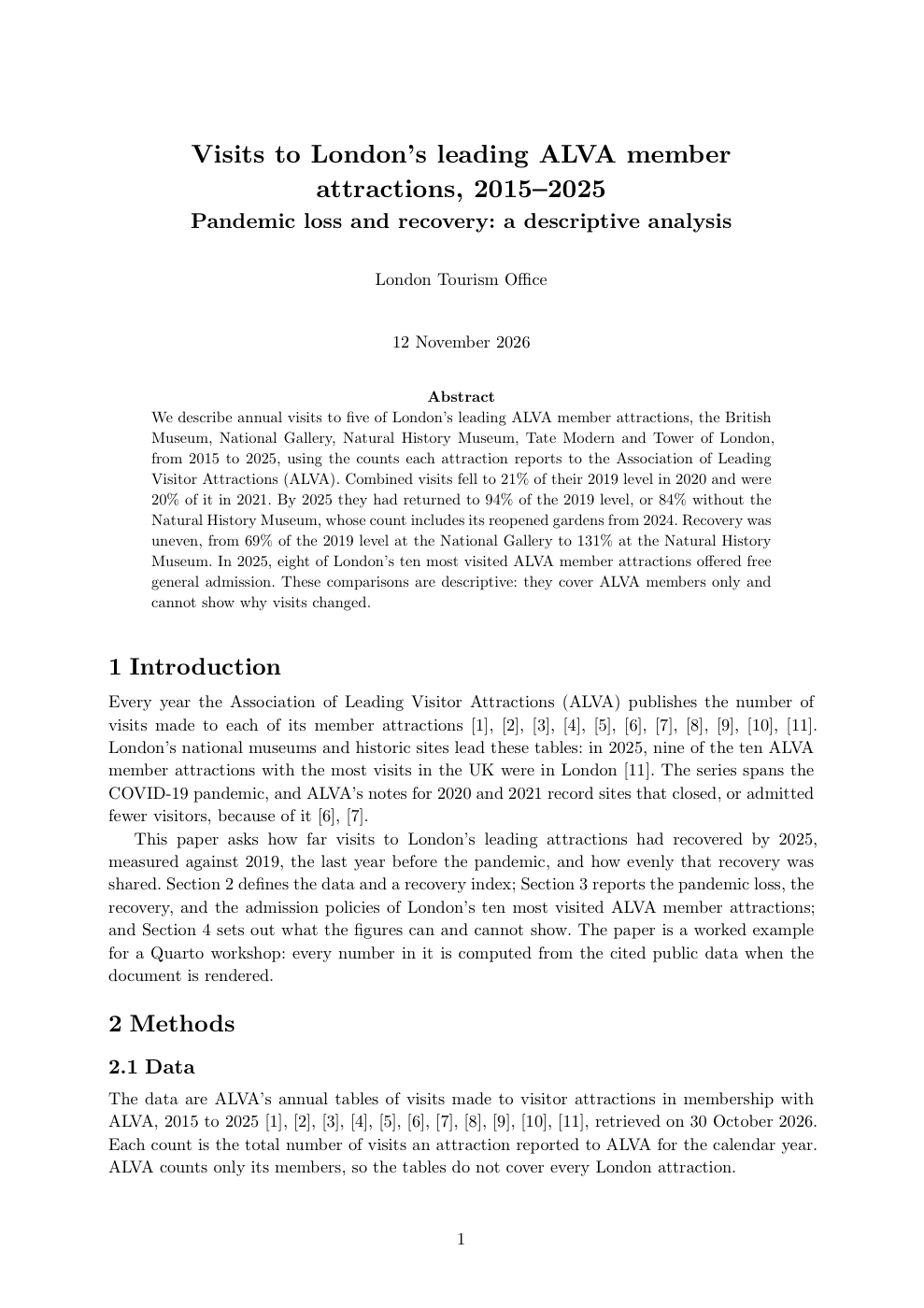
examples/london/london-whitepaper.qmd.
Three traps, all met while building the example. The paper’s settings need Quarto 1.10 or newer: Quarto 1.6.40’s Typst rejects them with “unexpected argument: spacing”. An inline expression in a YAML abstract runs before the setup cell and fails, so the finished example writes its abstract in the body, in a raw Typst block. And Typst prints its own heading above the reference list, “Bibliography” by default, which the prompt changes with #set bibliography(title: [References]) so the paper needs no References heading of its own.
A genuine LaTeX PDF is also available, as format: pdf, but it needs a TeX distribution, for example quarto install tinytex. For most reports Typst is faster and simpler.
Summary
- Pushing copies your commits to GitHub; a pull request shows a diff for someone else to review before it counts.
- A built site is static files: upload them, or let a host build them.
- A
_quarto.ymlwith a render list makes a folder a website. - The first
quarto publish gh-pagesis yours; later updates can be the agent’s. - A changed input reaches every page whose code loads it; copies and the live site do not.
That completes one guide for many audiences. In the water analysis the hard part is the analysis itself: grouping Colombia’s municipal zones into kinds by water safety, services and context. That one analysis is then published as a report, slides, a blog post and a website, all reading the results of one script, and its rebuild test changes a setting of the analysis instead of a number in a table.
Further reading
- Scott Chacon and Ben Straub, Pro Git, Branches in a nutshell; GitHub, About pull requests (checked 2026-10-31).
- Quarto, Websites, Publishing, GitHub Pages and other services (checked 2026-11-01 and 2026-11-07).
- GitHub CLI,
gh repo create(checked 2026-11-01). - Quarto, Citations and Typst options (checked 2026-11-01).