Prompt, Check, Publish
Reproducible Data Publishing with Quarto and AI Coding Agents
Quarto, reproducible publishing, coding agents, Markdown, Python, EPUB, data analysis, k-means clustering
Preface: How to Use This Book
Change one number in a dataset, and how many documents are now wrong? If the number was copied by hand into a report, a slide, an email and a web page, nobody knows without searching. This book teaches a way of publishing with nothing to search for: you write once, in plain text, and a web page, a Word document, a PDF, slides, an e-book, a website, a blog and a dashboard all rebuild from that one source with one command. The program that rebuilds them is Quarto.
This book is about producing publication-quality documents that are reproducible from their data and code, at a speed that coding agents have only recently made possible. Reproducible means every number, table and figure is computed by code from the data, kept beside the prose, so one command rebuilds them all and anyone can check how they were made. Publication quality means each output is fit for the reader who will use it: laid out, captioned, cited and checked. The speed comes from the agent. The cryptic commands and fragile configuration that used to stand between an analysis and its published, interactive form are no longer the bottleneck: you describe the step, the agent writes the code and runs the commands, and you check the result.
Quarto is one of three parts. With git, which records every version of the source, and a hosting service such as GitHub Pages, which puts the result on the web, it lets one person produce reproducible, publication-quality work for a wide range of settings and formats: a page read on a phone, a report printed for a meeting, slides on a projector, an e-book, an interactive dashboard. A coding agent does the typing for all three, and this book shows you how to direct it and check its work.
Prompt, Check, Publish
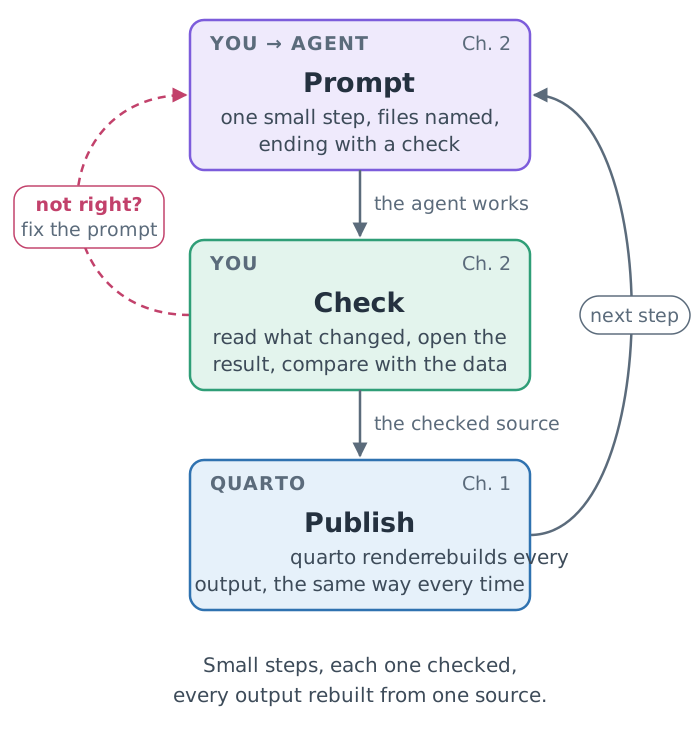
The title names the method, a loop you run at every step of every project. You prompt a coding agent, a program that writes files and runs commands at your request, describing one small piece of work with its files and columns named. It is an agent, not a chat, because it acts: where a web chat replies with code for you to copy and run, an agent edits your files and runs the commands itself, then reports back. You check what it did: read what changed, look at the result, compare it with the data. An agent can be fluent, fast and wrong, so this step is never skipped, and it is always yours. Then Quarto publishes, rebuilding every output from the checked source the same way every time. Chapter 1 explains why the last step can be trusted, and Chapter 2 how to make the first two reliable.
Every hands-on step from Part II on goes once round the loop in Figure 1.
Who this book is for
I wrote this book for analysts, researchers, data scientists, machine-learning engineers, technical founders, educators and students: anyone who works with data and code and needs to share the results. Most of all it is for people who publish numbers that change: the analyst whose monthly pack is copied into Word and PowerPoint by hand, the researcher whose figures must survive a resubmission, the engineer who writes up every evaluation three times, for a report, a deck and a page, and the founder who sends investors a figure from the wrong month. It shows how to publish everything from one plain-text source, prose and code together, with Quarto. Quarto is free and open source, and it is traditional software, not AI, so the same source always builds the same report, slide deck or web page: reproducible, interactive and of publication quality. With a coding agent, work that once took days now takes minutes. Along the way, I explain the concepts, the arguments and the decisions behind each step.
Reproducibility is why I wrote this book. Work that others can rebuild earns their trust, justifies the decisions made on it, and gives them something to build on, which is how science, technology and understanding move forward. More automation means fewer errors and a better experience, for the people who make the work and for those who read it.
Publishing is half the job; the other half is being read. Content works only if it engages the people it is for, so the book treats every output as something a particular reader will use, and checks it as that reader would. I hope it improves the interactions, and the outcomes, of everyone who works with data, software and AI applications and has to communicate them.
Start-ups get a particular kind of value from it, and should know its limits. The method pays where a young company’s numbers change: the monthly investor update, the benchmark or evaluation white paper, the per-customer report, the documentation site. A small team that already lives in a repository with an agent gets it almost for free, and the checking habit keeps a wrong number away from an investor. It pays less where design or co-editing dominates: the designed pitch deck, the marketing site and the plan the co-founders comment on in a shared document can stay where they are (When Quarto is the wrong tool).
You may be new to Quarto, to coding agents or to both. No programming is assumed: I explain the Python the agent writes, but you do not have to write it. If the terminal is new to you, 4 Setting Up Your Machine teaches the little you need, one checked step at a time, and 5 A First Report, by Hand has you use it by hand on a real report before you give an agent its first edit. Appendix B — Keys, Symbols and Terminal Habits collects the keys, paths and error messages worth knowing. The book’s code is Python; Quarto runs R just as well, through knitr, but this book does not teach it.
You will need a computer on which you can install software (Windows, Mac or Linux), a free GitHub account, and an account with one coding agent (Before you start lists what each needs). If you cannot install software, a ready-made environment in your browser will do (Without installing anything: a codespace), and Before you start gives a low-cost route to an agent.
Free and open source, nearly all the way
Almost everything this book uses is free and open-source software: you may use it, read its source, change it and share it, at no cost, on any computer you like. Ubuntu, the Linux that Windows readers install and many servers run; the terminal and its shell; Git; Python and the packages the projects use, pandas, matplotlib and scikit-learn; uv; Jupyter’s kernel; and the publishing chain itself, Quarto (MIT License), Pandoc (GNU GPL) and Typst (Apache License 2.0). The sites are plain static files that any web server can host.
That matters for more than price. A report built from open tools can be rebuilt by anyone, anywhere, years from now, without a licence, an account or the permission of the company that made the tools: the reproducibility this book is about depends on it. Open formats and open tools also mean no lock-in: the source of every document is plain text you own, and moving it to another tool, or another host, is a copy.
The exception is the coding agent. The program on your computer may itself be open source (OpenAI’s Codex CLI is published under the Apache License 2.0, as Google’s Gemini CLI was; Anthropic’s Claude Code is not), but the models that do the reasoning are proprietary and run on the vendors’ servers, and using them usually costs money; Before you start gives the free tier and the low-cost routes. That is the state of things as this book is written (licences checked 2026-11-18), not a law of nature. Open models, and free agents that run them, may change it, and nothing else in the method would need to change: the agent is the one part you could swap without touching a single source file.
Find your path
You need not read the book in order. Find your role in Table 1 and read the chapters it lists; each path ends at a finished output and skips what was written for someone else. Every path starts with 1 Publishing That Rebuilds Itself and 2 Working With a Coding Agent, which are short and are the method.
| You are | Then read | Your first finished output |
|---|---|---|
| An analyst who produces recurring reports | 3 The Fast Path, 10 One Set of Results; then the afterword’s metrics brief | a brief in HTML and Word that rebuilds from next month’s data |
| A data scientist, or an ML, AI or research engineer | 3 The Fast Path, 10 One Set of Results | an evaluation report and a model card from one results file, on a branch ready for review |
| A technical founder, or an early team | 3 The Fast Path, 10 One Set of Results, 14 Reports That Run Themselves, 16 At Work and in a Start-up; then the afterword’s investor update | an evaluation report and model card that investors and customers can check, and a monthly investor update that renders itself |
| A software engineer | 3 The Fast Path, then the checks of Compute once, check three ways and CI (15 Pull Requests and Builds You Can Trust); then the afterword’s design document | a report added to a repository on a branch, with a guard, and a check that rebuilds it on every pull request |
| A researcher or graduate student | Using AI in research: say it, own it, 3 The Fast Path (after 4 Setting Up Your Machine and 5 A First Report, by Hand if the terminal is new), 10 One Set of Results, then the water analysis (17 The Question, the Data and the Rules onwards) | an analysis published as a report, slides and a website, and a research supplement |
| An educator | 4 Setting Up Your Machine, 5 A First Report, by Hand, Part II (6 Markdown, Rendering and Project Rules to 9 Publishing and Proving the Rebuild), Appendix I — Running This as a Workshop | the London guide as a website, and the workshop to teach it |
| A student | Using AI in research: say it, own it, 4 Setting Up Your Machine, 5 A First Report, by Hand, Part II, the afterword’s coursework report | a coursework report a marker can rebuild |
| New to the terminal | 4 Setting Up Your Machine, 5 A First Report, by Hand, Part II, the water analysis | the London guide on its own website |
If you already use a terminal and Git, Part I’s fast path (3 The Fast Path) replaces its two chapters for beginners; if not, start with them, and take the fast path afterwards to reach Part III.
The three running examples
Every concept is tied to one of three projects, each built on real, cited data.
A London visitor guide (Part II). For the city’s tourism office, you write one guide that becomes a web page, a Word brief for partners, a printed flyer, a dashboard for managers and a published website. Every visitor number in it, from the 7,116,929 visits to the Natural History Museum (South Kensington) in 2025 down, is computed from the counts published by the Association of Leading Visitor Attractions.
A model evaluation at a start-up (the fast path and Part III). Acme Signals, a fictional two-person company, ranks a bank’s marketing contacts for its call centre and evaluates each release of its model on the real UCI Bank Marketing data. You add Quarto to its existing repository and publish one set of results as an evaluation report and a model card, every number read from the results its own script computes.
Drinking-water risk in Colombian municipalities (the water analysis, Part V). You group Colombia’s municipal zones into kinds by water safety, services and context, from 2016 to 2023, compare health and education outcomes between the kinds, and publish the analysis as a report, slides, a blog post and a website, all from one analysis script. Most of the data are Colombian open data, joined by official municipality codes; rainfall comes from the Climate Hazards Center’s CHIRPS data and altitude from NASA’s SRTM elevation data (Appendix G — Data Sources, Licences and Credits).
How the book is organised
Part I covers what you need first: what Quarto does (1 Publishing That Rebuilds Itself) and how to work with a coding agent safely (2 Working With a Coding Agent), then one of two routes. The fast path (3 The Fast Path) adds Quarto to an existing repository; the route from zero sets up your computer (4 Setting Up Your Machine) and has you make a first report by hand (5 A First Report, by Hand): render it, check it against its data, record it with Git and undo a change yourself before an agent makes one. The GitHub account it asks for is free; an agent’s account may not be. Claude Code, for one, needs a paid plan or pay-per-use billing (checked 2026-11-18; Before you start lists what each agent needs, and a low-cost route). Part II builds the London guide, one format at a time, and is the foundations in depth. Part III is the craft of the outputs professionals are asked for, from one set of evaluation results. Part IV takes them into a team and an organisation: pull requests, continuous integration, confidential data and approved tools. Part V, the water analysis, builds a full analysis with the statistics explained on the way. Each project ends by changing an input or a setting and explaining what the rebuild changed. The afterword offers five projects that carry the method into your own work, a metrics brief, a research supplement, a coursework report, a monthly investor update and a design document with live numbers, each rebuilt from a fresh copy of its repository (Afterword). The appendices hold the Windows setup, the terminal’s keys and habits, a cheatsheet, troubleshooting, every checkpoint, the data sources, how this book is built, and the facts that change, with their dates.
By the end of the book you will be able to:
- explain how Quarto turns one source into many formats, and why every rebuild gives the same result;
- direct a coding agent safely: a folder of its own, written rules, one step per prompt, each ending in a check, and larger tasks only when their checks can run without you;
- add Quarto to an existing repository, and review an agent’s change as a pull request and a fresh clone;
- publish one set of results to several readers, guarding every sentence whose words depend on the data;
- predict which outputs a changed input will update, and check that the rebuild did exactly that.
Your first afternoon
Part I fits in an afternoon, and it ends with something to show for it. 1 Publishing That Rebuilds Itself and 2 Working With a Coding Agent are reading: nothing to install, nothing to type. If you already use a terminal and Git, 3 The Fast Path takes you from there to a report in three formats in under an hour. Otherwise, 4 Setting Up Your Machine sets up your computer in six steps, each with a check; allow about an hour. 5 A First Report, by Hand is the first payoff, about 45 minutes at the keyboard: you copy a small report, render it yourself, check its numbers against the data and find the one that is wrong, start a Git history, change an input and undo it, and make three common mistakes on purpose to read their errors. Everything in it is typed by hand except the last step, the agent’s first edit, which you check with Git before you keep it.
What a hands-on step looks like
Each step is a three-part box, explained in How to read the agent boxes: the exact prompt to give your agent, what it will probably run, and the few things only you can do. Prompts are examples, not transcripts: agents vary, so check the result rather than the wording. Five kinds of aside step out of the main text; here is one of each.
A number computed from the data cannot disagree with the data. Asides like this one explain the mechanism behind a step, so that you can adapt it to your own project.
A render started while a live preview is rendering the same file collides with it. Asides like this one describe failures seen in practice, and how to avoid them.
Ask for one step per prompt: a small change is quick to check, and when something breaks you know which step broke it. Asides like this one hold judgement calls and habits.
The agent reports a render with no errors. Is the work checked?
Not yet: a clean render proves that the code ran, not that its numbers are right. Asides like this one ask a question to answer before you read on; the answer follows it.
Steps marked optional are for readers who are ahead; nothing later depends on them.
Three ways through
By role. Follow your path in Table 1. Each hands-on chapter ends at a checkpoint or at a finished example, where you can stop and resume later.
The core path. Parts II and V are long because they explain, but the path through them is shorter. On a first reading, leave for later the sections marked (optional) in their headings, the water analysis’s further challenges and its route that builds the model rather than using it: nothing later depends on them. What remains is the core:
- Part II: Markdown and the guide’s rules (6 Markdown, Rendering and Project Rules); computed numbers and one source in three formats (7 Documents That Compute); three audiences from one prompt (8 One Guide, Five Audiences); Git, publishing and one changed input (9 Publishing and Proving the Rebuild).
- Part III: one set of results, a model card and a report (10 One Set of Results), after the fast path (3 The Fast Path).
- The water analysis: the question, the data and the rules (17 The Question, the Data and the Rules); one chapter for each step of the analysis, from exploring (18 Look Before You Model) to the within-cluster check (22 Correlation Is Not Causation), copying each block’s finished script from clustering on (Use the model, or build it); then the report, the slides, the website and one changed setting (23 Publish Many).
Workshop-paced. The book grew out of a six-hour workshop and keeps its shape, while explaining what the workshop only had time to show: why each step works, where it fails, and when not to take it. Appendix I — Running This as a Workshop has the day’s agenda and the chapters each block covers (Table I.1 and Table I.2).
When you get stuck
You will get stuck: an install fails, a prompt goes wrong, a render stops with an error you have never seen. That is expected, and the book is built for it. Every hands-on block ends at a checkpoint, a folder in the workshop’s repository (checkpoints/), the copy of the workshop’s files you download during setup (Step 5: Run the setup check). It holds the project as it should be at that point, with a README listing the steps to catch up. In a workshop the rule is simple: stuck for two minutes, catch up. Where the book reaches a checkpoint, a catch-up box gives the one line to paste into your agent (Figure 2).
Reading on your own, you have time the room does not, so spend a few minutes on a diagnosis first. Each step uses only what 4 Setting Up Your Machine and 5 A First Report, by Hand teach:
- Where are you?
pwdprints the folder; the project’s commands work only inside it. - What changed?
git statuslists the files changed since your last commit, andgit diffshows how, including changes you did not mean to make. - What does the error say? Read its first line (Reading an error) and look it up in Appendix D — Troubleshooting.
- Try one fix, the one that line points to, and run the command again.
If that fix does not work, catch up. Afterwards, make one short check of your own: open the output that the checkpoint’s README names, and see that it shows what the book describes at that point.
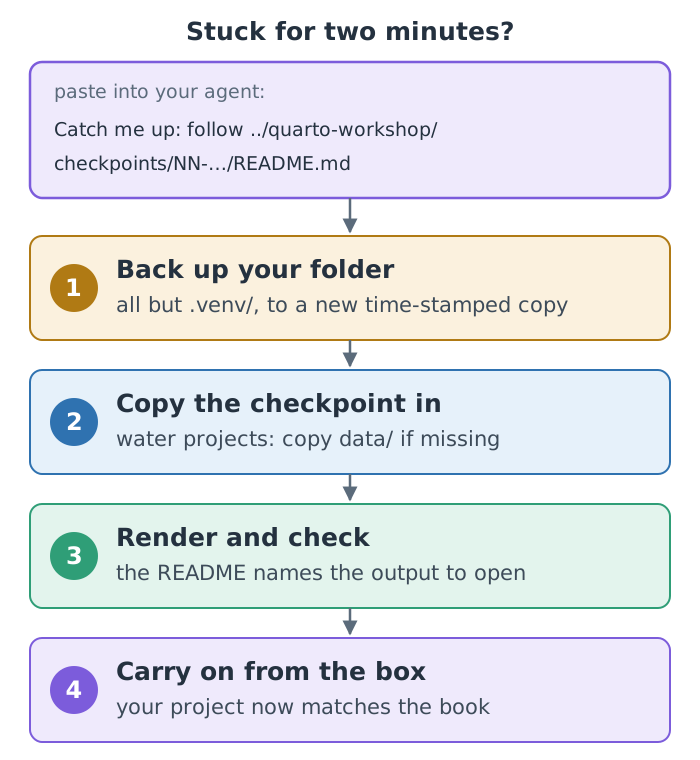
The README’s last step names the workshop slide to rejoin at. In the book, that place is the catch-up box itself, so after catching up you carry on reading from the box. If you were stuck partway through a block, go straight to its box: the checkpoint already holds the steps between where you stopped and the box. Appendix E — Checkpoints at a Glance, and Answers lists every checkpoint.
Two editions
This book comes as an e-book (EPUB) and as a website, built from the same source: it is its own first example of the method. The website edition runs everything interactive: the 3-D scenes of the London map, the k-means steps, the clusters and Colombia’s relief, and two data explorers. The e-book shows each as an animation or a still, with a link to the live version (the first, the London map, also has a QR code). Readers that cannot play animations show the first frame, designed as a useful still, and the website respects your reduced-motion setting.
Versions and dates
The book was built and checked with Quarto 1.10.20 (with its bundled Typst 0.15), Python 3.12 and uv, in November 2026. Facts that change, such as a model’s price, an agent’s account or a free hosting plan’s limits, carry the date they were checked, and are kept in one place, Appendix K — Facts That Change, which a rebuild updates everywhere they appear. Some will have changed by the time you read them; the principles around them should not have.
Chapter 1 needs nothing installed: start there.